
Coffee bundle
$29.90
Loading…


WhatsApp commerce
WarpCart turns WhatsApp into a storefront: browse a catalog carousel, drop replies, take M-Pesa, and fulfill — without sending customers to another app. Already on the WhatsApp Business app? Connect that number and keep the same chats on your phone while WarpCart handles the selling.
4,200+
Active vendors
38%
Chat conversion
$9.4M
Monthly GMV
Fresh Market Co.
online · WhatsApp Shop
Catalog
Coffee bundle
$29.90

Cold-press oil
$12.50

Market basket
$18.00
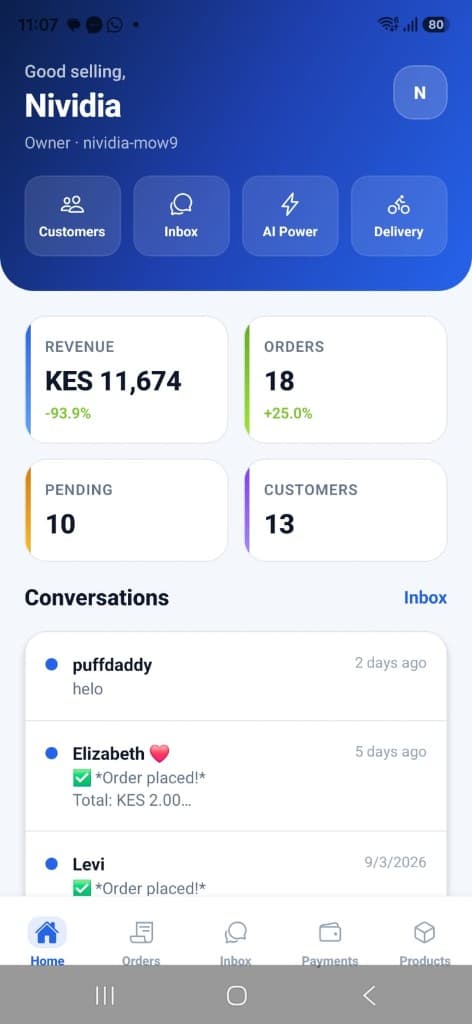
WarpCart Vendor App
Manage products, orders, customers, and every WhatsApp sale from one fast Android command center.
Built for Android Fast setup Manage on the go
Tutorial
A full run-through of the vendor workspace — sign in, products, orders, WhatsApp, payments, AI tokens, and store setup.
00:00: This tutorial explains how to create and manage a vendor account on WarpCart.
00:05: You will learn to set up products, handle orders, and customize your store effectively.
00:10: When you visit the shop, you start at the landing page and proceed to sign in.
00:15: New users create a vendor account by entering store details and selecting business options.
00:43: Click the Sign in button to open the login page where you can enter your credentials to access your account.
00:49: After signing in, you reach the dashboard where you can switch themes, view revenue, orders, and customers, and add new products or categories.
01:40: Add product categories such as shirts to organize your inventory effectively for easier product management.
01:48: View all products including those sold, remaining, and ordered to keep track of your inventory status.
02:00: Orders are categorized as pending, paid, or completed, helping you track payment and fulfillment progress.
02:20: Access order details to view totals and delivery info, and manage customer messages received via WhatsApp for order confirmation and shipment.
02:43: Click the Customers tab to view all visitors, their orders, and contact information integrated with WhatsApp.
02:51: Here you can see customer details and link your WhatsApp number via Meta to manage conversations and verify contacts.
03:33: Respond to customer messages directly within the conversation interface to maintain communication and support.
03:39: Add store details, FAQs, or upload documents to train the AI for better customer interaction and analytics support.
04:09: Analyze order data including averages, percentages, and customer message usage to monitor store performance.
04:19: Click the Payments tab to configure payment methods available to customers during checkout.
04:24: Set up payment details such as PayPal or local options and save them to enable direct customer payments.
04:41: Click the Pricing tab to manage AI token purchases and track usage for your store users.
04:47: Buy and monitor AI tokens by entering payment details and adjusting purchase amounts with the slider.
05:15: Update your store description, contact number, currency, logo, and delivery zones to personalize your profile.
05:37: Define delivery regions with fees, configure delivery services, and invite team members by email to assist with management.
06:02: Learn how WarpCart operates to enhance your store's workflow and product management.
06:07: Click the Dashboard tab to go back to the main overview of your store's performance and settings.
06:13: When finished, sign out to securely end your session and protect your account information.
06:18: Click the vendor sign in option to access your store dashboard, WhatsApp tools, and AI assistant login options.
06:25: Click the back to home button to return to the main landing page of the application.
06:30: This tutorial guides you through creating and managing a vendor account on WarpCart, including product setup, order management, customer communication, AI integration, payment configuration, and store customization.
Features
From first message to paid order — WarpCart handles the full commerce loop inside WhatsApp.
Let customers browse your catalog and checkout without leaving the chat.
Update products, prices, and stock — changes reflect in chat instantly.
Reach your audience with templates and targeted message campaigns.
Automatically follow up on abandoned carts and bring shoppers back.
Suggest relevant products based on what customers ask and buy.
Track orders, fulfillment, and payouts from one unified dashboard.
How it works
01
Connect a new Cloud API number, or keep the WhatsApp Business app you already use. Chats stay in sync on your phone.
02
Upload products, set prices, and configure delivery options in minutes.
03
Customers message you, browse products, and complete orders in chat.
04
Fulfill orders, track payments, and grow with built-in analytics.
Why WarpCart
No app downloads, no new habits. Your customers shop the way they already message friends and family.
Connect the WhatsApp Business number you already use. Automation and phone replies stay in the same chat.
Recover abandoned carts with automated follow-up sequences.
Answer product questions and take orders around the clock.
Unify catalog, inventory, orders, and payments in one workspace.
Run campaigns with templates, broadcasts, and performance tracking.
Pricing
Customer M-Pesa payments go to your till. WarpCart only charges AI usage for WhatsApp replies. Every new store gets 50,000 free tokens — no payment needed to start.
Starter
KES 500
100,000 tokens
Most popular
Growth
KES 2,000
500,000 tokens
Scale
KES 7,000
2,000,000 tokens
Get started
Create your vendor workspace in minutes. Your first 50,000 tokens are free.
Start free trial